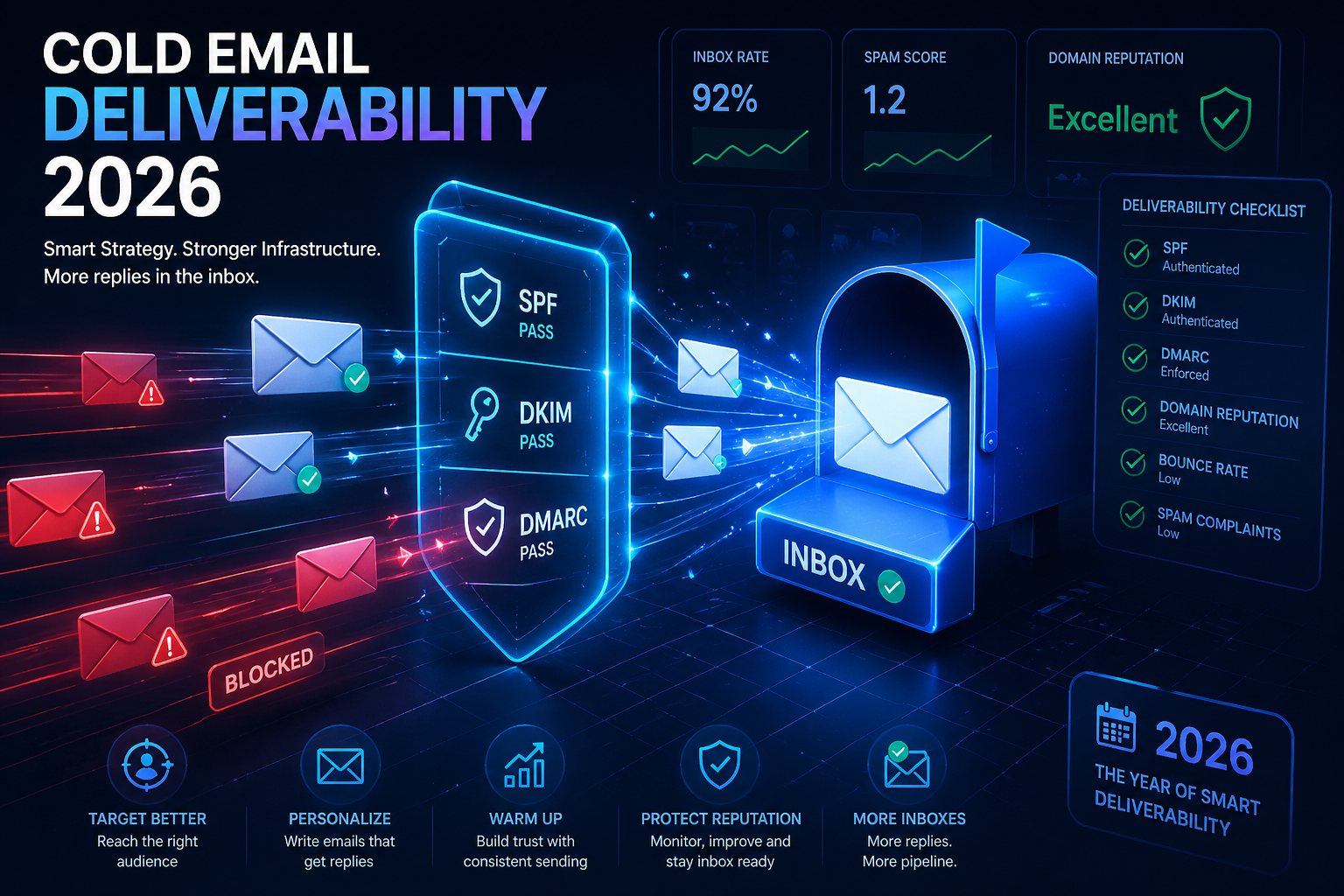
Quick Summary
- Infrastructure matters: Incorrect SPF, DKIM, or DMARC records silently kill inbox placement before your prospect ever sees the email.
- Volume kills reputation: Sending too many emails from a cold domain triggers spam filters. Domain warmup and inbox rotation are mandatory.
- Templates are dead: Signal-based personalization replaces merge tags. AI sentiment filters now detect lazy outreach.
- Your CTA is too aggressive: High-friction CTAs ("Book a call") reduce reply rates. Low-friction asks ("Worth exploring?") outperform by 3x.
- 0.3% is the new line: Google and Yahoo now enforce a 0.3% spam complaint threshold. Cross it and your domain is flagged.
Most cold email campaigns don't fail because of bad copy. They fail because of infrastructure, timing, and targeting mistakes that are invisible to the sender but obvious to every spam filter on the internet.
Cold email deliverability in 2026 is a different game. Google and Yahoo have tightened enforcement. AI-powered spam filters detect patterns that worked two years ago. And the teams still getting results have shifted from volume-based blasting to signal-based precision. This guide breaks down the 5 real reasons your campaigns are underperforming — and exactly how to fix each one. If you want to see how these fixes impact your numbers, run them through a Cold Email ROI Calculator first.
See how these metrics translate to revenue in our Cold Email ROI Benchmarks 2026 guide.
Reason 1: Your Email Infrastructure Is Broken
Before your prospect reads a single word, their email server has already decided whether to trust you.
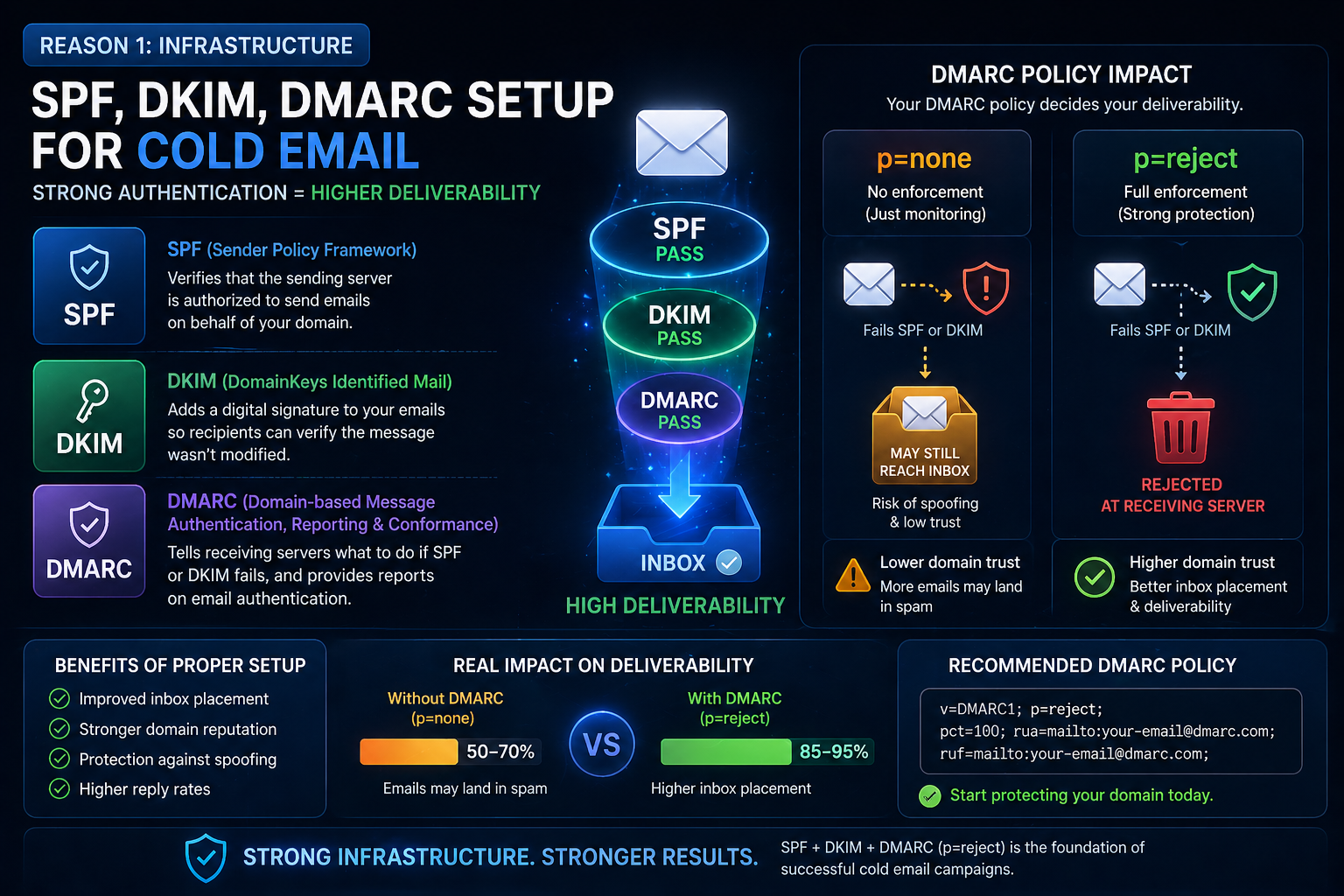
- SPF (Sender Policy Framework): Explains what it does — authorizes which servers can send email on behalf of your domain. Missing or misconfigured SPF records cause immediate spam placement. Checking this regularly acts as an email reputation score check.
- DKIM (DomainKeys Identified Mail): Adds a cryptographic signature to every email, proving it wasn't altered in transit. Without DKIM, Gmail and Outlook flag messages as potentially spoofed.
- DMARC (Domain-based Message Authentication): This is the policy layer that tells receiving servers what to do when SPF or DKIM fails. Deep dive into why p=reject matters:
- p=none means "do nothing" — provides no protection
- p=quarantine sends failures to spam
- p=reject blocks failures completely
- The silent killer: Many teams set up SPF/DKIM once and never check again. When they add new sending tools or switch email providers, the records break silently. We recommend checking authentication monthly.
If you're constantly asking yourself, "why are my cold emails going to spam in Gmail," start by verifying these three records.
Reason 2: You're Burning Your Domain With Volume
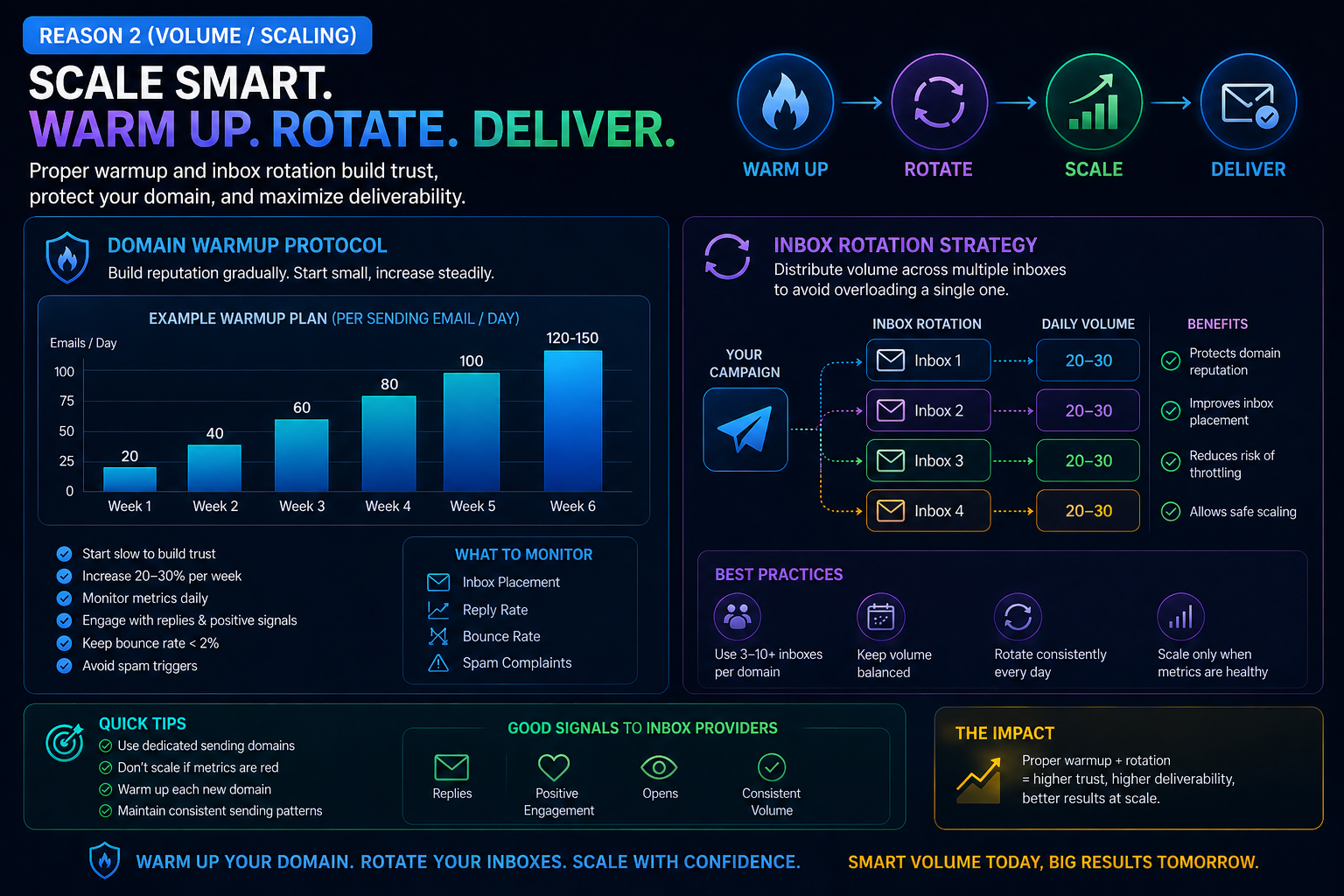
Sending 500 cold emails from a brand-new domain on day one is the fastest way to land in spam permanently.
- Domain warmup protocols: Gradually increasing send volume over 2-4 weeks builds sender reputation. Start with 10-20 emails per day, increase by 10-15% daily. Skipping warmup is the #1 mistake new outbound teams make.
- Cold email sending limits per day: In 2026, safe daily limits are approximately 30-50 per mailbox for cold outreach. Going above this triggers rate limiting and spam flags.
- Secondary domain strategy: NEVER send cold email from your primary business domain. Use secondary domains (e.g., "getcompanyname.com" or "trybrandname.com") so your main domain reputation stays clean even if a campaign triggers spam flags.
- Inbox rotation strategy: Using multiple mailboxes across multiple domains distributes send volume. Each mailbox sends 30-40 emails/day. 5 mailboxes = 150-200 daily capacity without triggering any single mailbox.
- Dynamic IP rotation: Sophisticated senders rotate sending IPs to avoid IP-based blacklisting, though this matters less than domain reputation in 2026.
- Engagement-based deliverability: Gmail now uses recipient engagement (opens, replies, moves to inbox) to determine future placement for your domain.
Reason 3: Your "Personalization" Isn't Personal
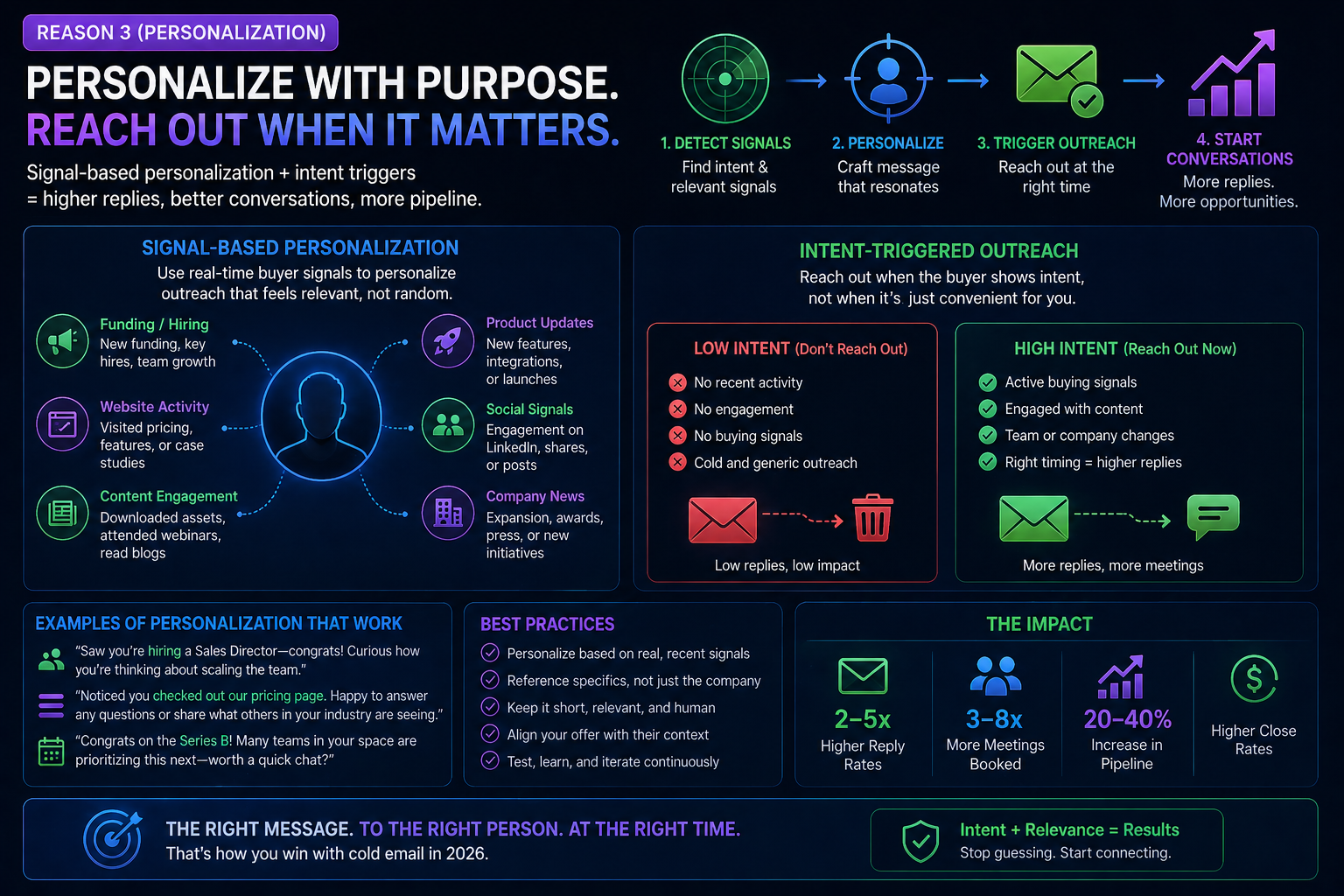
Adding {{firstName}} and {{companyName}} to a template isn't personalization anymore. Gmail's AI sentiment filters can detect formulaic outreach in milliseconds.
- The death of template variables: Merge tags were the standard in 2020. In 2026, every spam filter has been trained on millions of templated cold emails. The patterns are detectable. AI sentiment filters in Gmail analyze message structure, not just content.
- Signal-based personalization explained: Signals include:
- Hiring activity (company just posted a role related to your service)
- Funding announcements
- Tech stack changes (they adopted a tool your product integrates with)
- Website updates or redesigns
- New product launches
- Intent-triggered sales outreach: Instead of mass-sending, you trigger outreach when a signal indicates the prospect might actually need your solution right now. This is why signal-based campaigns get 2-3x higher positive reply rates.
- Positive reply rate vs open rate: Open rates are unreliable in 2026 (Apple Mail Privacy, bot opens). Positive reply rate is the only meaningful engagement metric.
Understand the difference between marketing email and cold outreach deliverability: marketing emails go to opted-in lists with high engagement, while cold email goes to strangers, so deliverability standards are significantly stricter.
Is Your Website Losing the Leads Your Emails Generate?
Your cold emails land in the inbox and get replies — but does your website convert those visitors into clients? Find out for free.
Get My Free Site Audit →Reason 4: Your CTA Is Killing Your Reply Rate
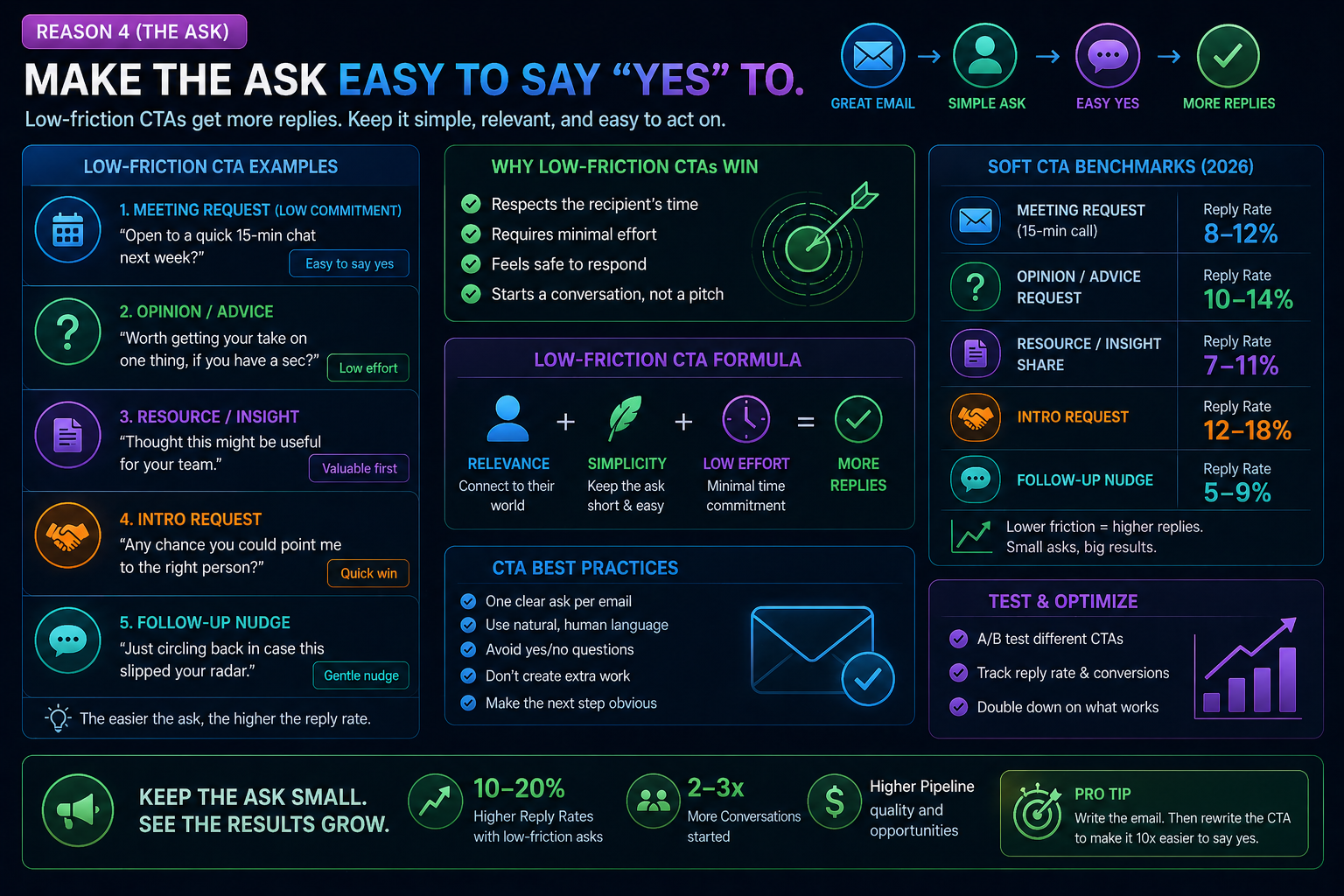
You wrote a great email. The prospect read it. And then you asked them to 'jump on a 30-minute call this week' — and they deleted it.
- High-friction vs low-friction CTAs: High-friction = asking for a commitment (call, demo, meeting). Low-friction = asking for a micro-commitment (reply, interest check, permission to send more info).
- Low-friction CTA examples that work in 2026:
- "Worth exploring?"
- "Open to learning more?"
- "Would it make sense to share a quick breakdown?"
- "Not sure if this is relevant — happy to be told no."
- Soft call to action benchmarks: Low-friction CTAs consistently produce 2-3x higher reply rates than direct calendar asks. The meeting comes in the follow-up, not the first touch.
- The psychology: Cold email is an interruption. The prospect owes you nothing. Reducing the ask reduces the friction. Once they reply (even with a question), you've started a conversation — and conversations convert.
When searching for how to fix low open rates 2026, remember that the real fix isn't subject lines, it's relevance and deliverability.
Reason 5: You're Crossing the Spam Complaint Line
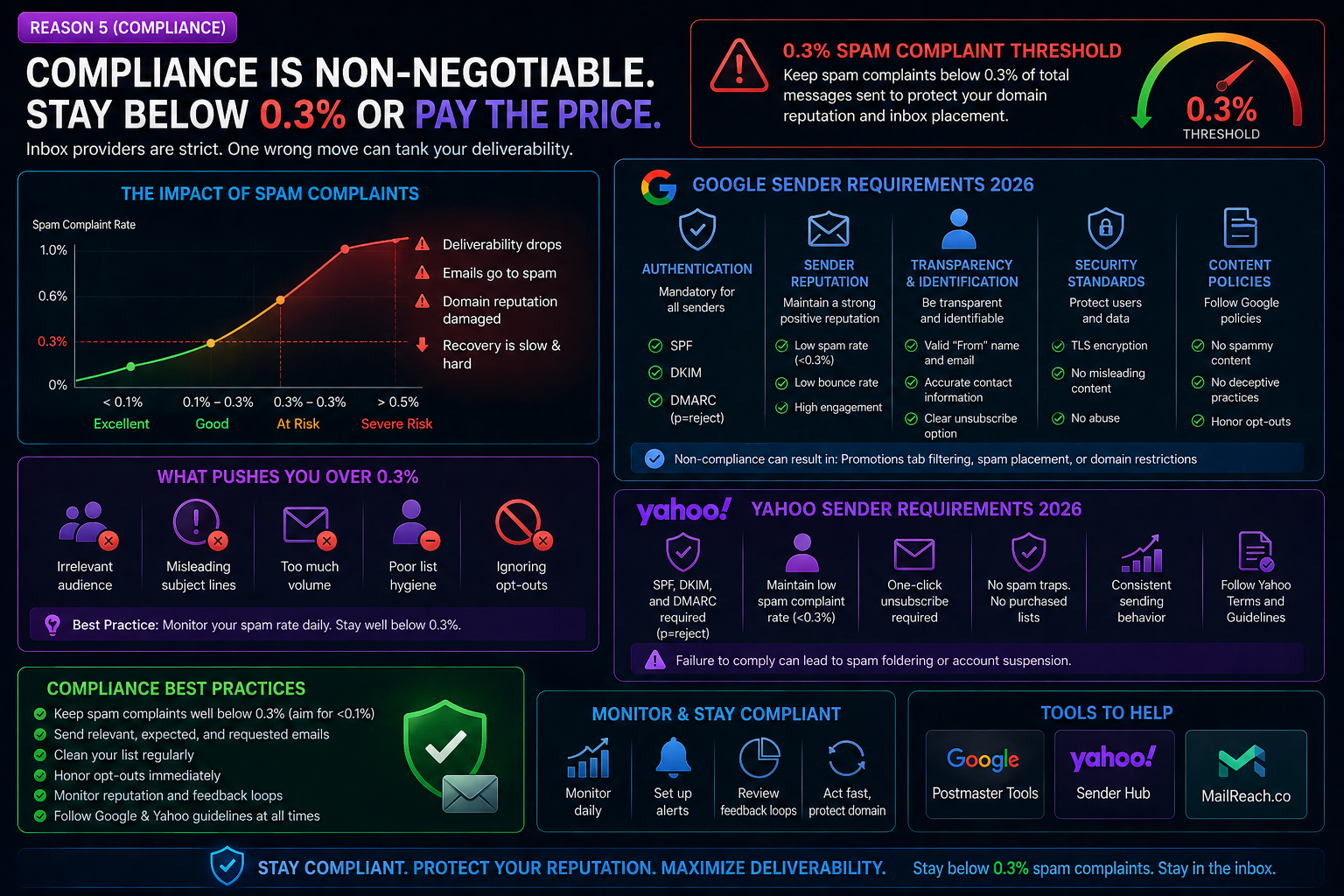
In February 2024, Google and Yahoo rolled out new sender requirements. By 2026, enforcement is aggressive — and the threshold is lower than most senders realize.
- The 0.3% spam complaint threshold: If more than 0.3% of recipients mark your email as spam, Google will throttle or block your domain. That's 3 complaints per 1,000 emails. For a 5,000-email campaign, that's just 15 spam reports.
- Google/Yahoo sender requirements 2026:
- Valid SPF, DKIM, and DMARC (p=quarantine or p=reject)
- One-click unsubscribe header (even for cold email, this is now expected)
- Clear sender identification
- Spam complaint rate below 0.3%
- Forward-confirmed reverse DNS
- How to stay under the line:
- Better targeting (don't email people who'll never buy)
- Easy opt-out in every email
- Clean your lists — remove bounces, invalid emails, and catch-all domains
- Monitor your domain reputation using Google Postmaster Tools
- Best time to send cold emails 2026: Tuesday through Thursday, 8-10am in the prospect's timezone. Avoid Mondays and Fridays. This reduces the chance of being marked as spam because recipients are more engaged mid-week.
How to Fix Your Cold Email Funnel Today
- Audit your SPF, DKIM, and DMARC records today
- Set up secondary sending domains and warm them for 2-4 weeks
- Replace template variables with signal-based personalization
- Switch every CTA to a low-friction ask
- Monitor your spam complaint rate weekly using Google Postmaster Tools
- Run your updated numbers through a Cold Email ROI Calculator to see the revenue impact
Conclusion
Cold email deliverability in 2026 comes down to trust. Trust with email providers (infrastructure), trust with spam filters (volume and compliance), and trust with prospects (personalization and soft CTAs). Fix these 5 problems and your campaigns will land in the inbox, get read, and generate replies. Ignore them and you're burning budget sending emails that nobody ever sees.
FAQ
Why are my cold emails going to spam in Gmail?
Most likely your SPF, DKIM, or DMARC records are misconfigured, or your domain hasn't been properly warmed up. Check your authentication records and start with low daily send volumes.
What is the spam complaint threshold for Google in 2026?
Google enforces a 0.3% spam complaint threshold. Exceeding this will cause your emails to be throttled or blocked entirely.
How many cold emails can I send per day in 2026?
A safe limit is 30-50 emails per mailbox per day. Use multiple mailboxes and inbox rotation to scale volume without triggering spam filters.
What is signal-based personalization?
Instead of using template merge tags, signal-based personalization triggers outreach based on real buying signals like hiring activity, funding, or tech stack changes.
Does open rate still matter for cold email?
No. Open rates are unreliable due to Apple Mail Privacy Protection and bot pre-fetching. Focus on positive reply rate and meeting booking rate instead.
What is a low-friction CTA?
A CTA that asks for a small commitment rather than a meeting. Examples include "Worth exploring?" or "Open to learning more?" These outperform direct calendar asks by 2-3x.
How long does domain warmup take?
Typically 2-4 weeks of gradually increasing send volume from 10-20 emails/day up to your target daily limit.